Worked example
Borewell pump controller and monitor
A wall-mounted controller that trips a submersible pump on dry run or bad voltage, then texts the owner why.
Not a past job. This is how we would build it.
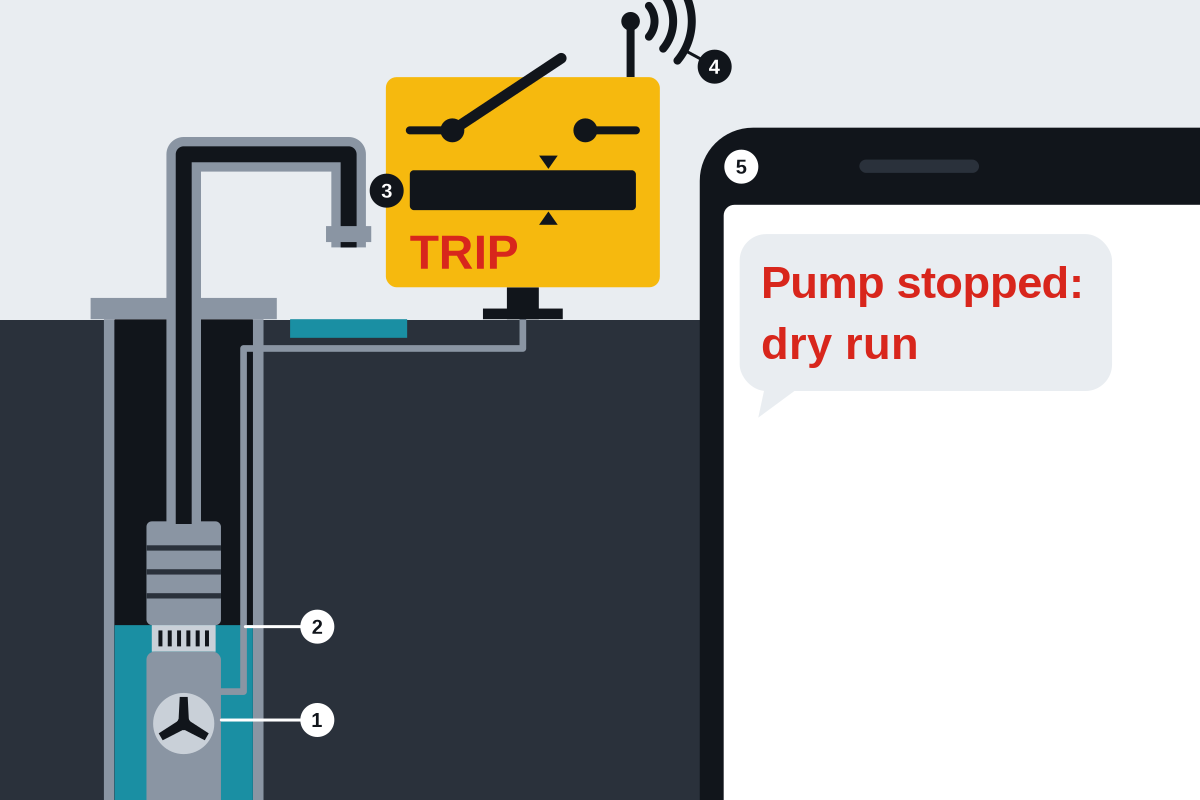
- Submersible pump
- Water level
- Controller: contactor and motor current
- Message over GSM
- Owner’s phone
- Who it is for
- A pump maker using a bought-in starter panel.
- Mechanism
- IP54 wall enclosure, 1.5 mm sheet, separate gland plate.
- Electronics
- ESP32-C3, CT current sensors, contactor drive, plug-in GSM modem, 230 V.
- Firmware
- C on ESP-IDF. Protection kept apart from connectivity.
- Target
- 5 HP pump. Trip below 70 percent of baseline current for 8 seconds.
The situation
A relay panel with an analogue dry-run probe drifts. The result is nuisance trips, or contactors burnt by voltage dips, and the pump gets the blame.
How we would build it
One board meters, protects and drives the contactor. CT sensors read current at 4 kHz. A dry run shows as a fall in current, so no probe dips into the well.
Design
Decisions that matter
Dry run without a probe
Low head also lowers current. So it stores a start-up baseline for each installation.
Riding through dips
A capacitor holds the contactor through sags under 300 ms. Restarts wait a random 10 to 40 seconds.
Heat in a sealed box
IP54 means no vents. The contactor sits low, with its own heat path.
Fitting on the line
One harness connector takes the field wiring.
Handover
What you would get
- Pilot units and an enclosure sample
- Schematics, PCB files and BOM
- Enclosure drawings in DXF and STEP
- Firmware source and flashing procedure
- A production test jig
- A user manual and setup card